Cosmological Source Catalog
SOXS provides the make_cosmological_sources_file() function to generate a set of photons from cosmological halos and store them in a SIMPUT catalog.
First, import our modules:
[1]:
import matplotlib

matplotlib.rc("font", size=18)
import soxs
Second, define our parameters, including the location within the catalog where we are pointed via the argument cat_center. To aid in picking a location, see the halo map.
[2]:
exp_time = (200.0, "ks")
fov = 20.0  # in arcmin
sky_center = [30.0, 45.0]  # in degrees
cat_center = [3.1, -1.9]
Now, use make_cosmological_sources_file() to create a SIMPUT catalog made up of photons from the halos. We’ll set a random seed using the prng parameter to make sure we get the same result every time. We will also write the halo properties to an ASCII table for later analysis, using the output_sources parameter:
[3]:
soxs.make_cosmological_sources_file(
    "my_cat.simput",
    "cosmo",
    exp_time,
    fov,
    sky_center,
    cat_center=cat_center,
    prng=33,
    overwrite=True,
)
soxs : [INFO     ] 2026-04-13 07:40:13,165 Creating photons from cosmological sources.
soxs : [INFO     ] 2026-04-13 07:40:13,165 Loading halo data from catalog: /Users/jzuhone/Source/soxs/soxs/files/halo_catalog.h5
soxs : [INFO     ] 2026-04-13 07:40:13,230 Coordinates of the FOV within the catalog are (3.1, -1.9) deg.
soxs : [INFO     ] 2026-04-13 07:40:13,230 Selecting halos in the FOV.
soxs : [INFO     ] 2026-04-13 07:40:13,234 Number of halos in the field of view: 384
soxs : [INFO     ] 2026-04-13 07:40:19,891 Created 5786907 photons from cosmological sources.
soxs : [INFO     ] 2026-04-13 07:40:19,960 Appending source 'cosmo' to my_cat.simput.
[3]:
<soxs.simput.SimputCatalog at 0x108cb8c20>
Next, use the instrument_simulator() to simulate the observation:
[4]:
soxs.instrument_simulator(
    "my_cat.simput",
    "cosmo_cat_evt.fits",
    exp_time,
    "lynx_hdxi",
    sky_center,
    overwrite=True,
)
soxs : [INFO     ] 2026-04-13 07:40:20,199 Simulating events from 1 sources using instrument lynx_hdxi for 200 ks.
soxs : [INFO     ] 2026-04-13 07:40:20,885 Scattering energies with RMF xrs_hdxi.rmf.
soxs : [INFO     ] 2026-04-13 07:40:22,475 Detected 2164083 events in total.
soxs : [INFO     ] 2026-04-13 07:40:22,483 Adding background events.
soxs : [INFO     ] 2026-04-13 07:40:22,530 Adding in point-source background.
soxs : [INFO     ] 2026-04-13 07:40:34,771 Simulating events from 1 sources using instrument lynx_hdxi for 200 ks.
soxs : [INFO     ] 2026-04-13 07:40:38,923 Scattering energies with RMF xrs_hdxi.rmf.
soxs : [INFO     ] 2026-04-13 07:40:41,669 Detected 3835754 events in total.
soxs : [INFO     ] 2026-04-13 07:40:41,688 Generated 3835754 photons from the point-source background.
soxs : [INFO     ] 2026-04-13 07:40:41,688 Adding in astrophysical foreground.
soxs : [INFO     ] 2026-04-13 07:40:49,759 Adding in instrumental background.
soxs : [INFO     ] 2026-04-13 07:40:50,677 Making 34149988 events from the galactic foreground.
soxs : [INFO     ] 2026-04-13 07:40:50,677 Making 523003 events from the instrumental background.
soxs : [INFO     ] 2026-04-13 07:40:59,013 Observation complete.
soxs : [INFO     ] 2026-04-13 07:40:59,015 Writing events to file cosmo_cat_evt.fits.
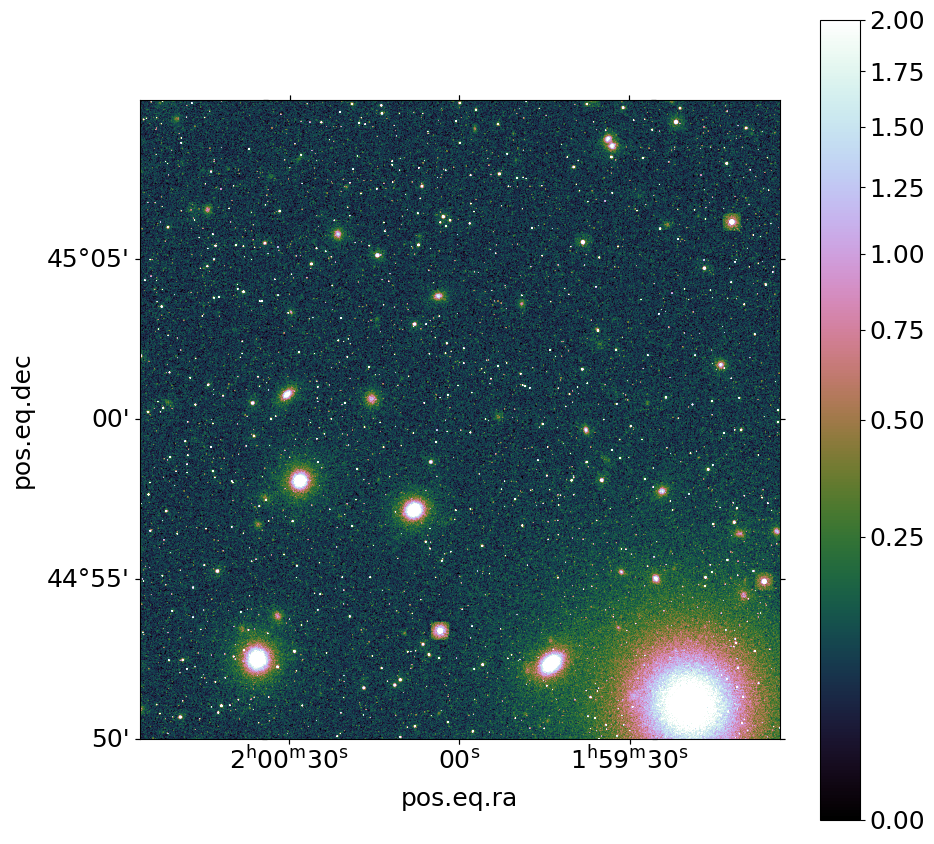
We can use the write_image() function in SOXS to bin the events into an image and write them to a file, restricting the energies between 0.7 and 7.0 keV:
[5]:
soxs.write_image(
    "cosmo_cat_evt.fits", "cosmo_img.fits", emin=0.7, emax=7.0, overwrite=True
)
We can now show the resulting image:
[6]:
fig, ax = soxs.plot_image(
    "cosmo_img.fits",
    stretch="sqrt",
    cmap="cubehelix",
    vmin=0.0,
    vmax=2.0,
    width=0.33333,
)