Two Clusters
Using the SOXS Python interface, this example shows how to generate photons from two thermal spectra and two \(\beta\)-model spatial distributions, as an approximation of two galaxy clusters.
[1]:
import matplotlib

matplotlib.rc("font", size=18)
import soxs
Generate Spectral Models
We want to generate thermal spectra, so we first create a spectral generator using the ApecGenerator class:
[2]:
emin = 0.05  # keV
emax = 20.0  # keV
nbins = 20000
agen = soxs.ApecGenerator(emin, emax, nbins)
Next, we’ll generate the two thermal spectra. We’ll set the APEC norm for each to 1, and renormalize them later:
[3]:
kT1 = 6.0
abund1 = 0.3
redshift1 = 0.05
norm1 = 1.0
spec1 = agen.get_spectrum(kT1, abund1, redshift1, norm1)
[4]:
kT2 = 4.0
abund2 = 0.4
redshift2 = 0.1
norm2 = 1.0
spec2 = agen.get_spectrum(kT2, abund2, redshift2, norm2)
Now, re-normalize the spectra using energy fluxes between 0.5-2.0 keV:
[5]:
flux1 = 1.0e-13  # erg/s/cm**2
flux2 = 5.0e-14  # erg/s/cm**2
emin = 0.5  # keV
emax = 2.0  # keV
spec1.rescale_flux(flux1, emin=0.5, emax=2.0, flux_type="energy")
spec2.rescale_flux(flux2, emin=0.5, emax=2.0, flux_type="energy")
We’ll also apply foreground galactic absorption to each spectrum:
[6]:
n_H = 0.04  # 10^20 atoms/cm^2
spec1.apply_foreground_absorption(n_H)
spec2.apply_foreground_absorption(n_H)
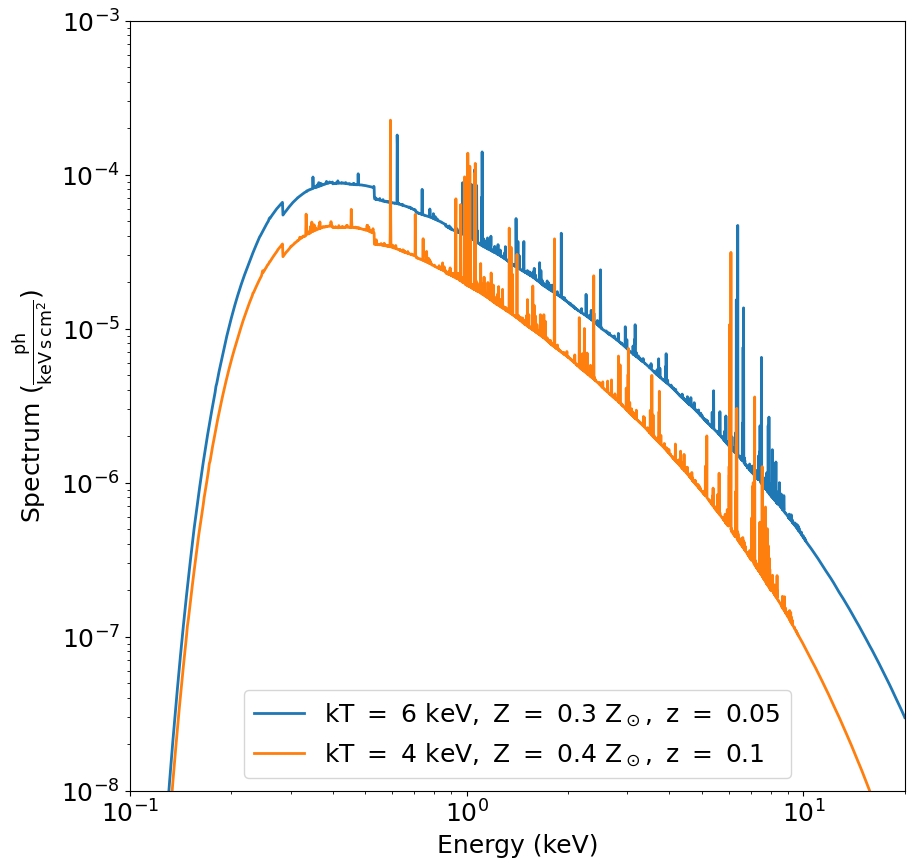
spec1 and spec2 are Spectrum objects. Let’s have a look at the spectra:
[7]:
fig, ax = spec1.plot(
    xmin=0.1,
    xmax=20.0,
    ymin=1.0e-8,
    ymax=1.0e-3,
    label="$\mathrm{kT\ =\ 6\ keV,\ Z\ =\ 0.3\ Z_\odot,\ z\ =\ 0.05}$",
)
spec2.plot(
    label="$\mathrm{kT\ =\ 4\ keV,\ Z\ =\ 0.4\ Z_\odot,\ z\ =\ 0.1}$", fig=fig, ax=ax
)
ax.legend()
<>:6: SyntaxWarning: invalid escape sequence '\m'
<>:9: SyntaxWarning: invalid escape sequence '\m'
<>:6: SyntaxWarning: invalid escape sequence '\m'
<>:9: SyntaxWarning: invalid escape sequence '\m'
/var/folders/6n/s0lf9frd7zq68c7dhlr090y4c91lh9/T/ipykernel_13531/1595130315.py:6: SyntaxWarning: invalid escape sequence '\m'
  label="$\mathrm{kT\ =\ 6\ keV,\ Z\ =\ 0.3\ Z_\odot,\ z\ =\ 0.05}$",
/var/folders/6n/s0lf9frd7zq68c7dhlr090y4c91lh9/T/ipykernel_13531/1595130315.py:9: SyntaxWarning: invalid escape sequence '\m'
  label="$\mathrm{kT\ =\ 4\ keV,\ Z\ =\ 0.4\ Z_\odot,\ z\ =\ 0.1}$", fig=fig, ax=ax
[7]:
<matplotlib.legend.Legend at 0x155f79a90>
Generate Spatial Models
Now what we want to do is associate spatial distributions with these spectra. Each cluster will be represented using a \(\beta\)-model. For that, we use the BetaModel class. For fun, we’ll give the second BetaModel an ellipticity and tilt it by 45 degrees (a bit extreme, but it demonstrates the functionality nicely):
[8]:
# Parameters for the clusters
r_c1 = 30.0  # in arcsec
r_c2 = 20.0  # in arcsec
beta1 = 2.0 / 3.0
beta2 = 1.0

# Center of the field of view
ra0 = 30.0  # degrees
dec0 = 45.0  # degrees

# Space the clusters roughly a few arcminutes apart on the sky.
# They're at different redshifts, so one is behind the other.
dx = 3.0 / 60.0  # degrees
ra1 = ra0 - 0.5 * dx
dec1 = dec0 - 0.5 * dx
ra2 = ra0 + 0.5 * dx
dec2 = dec0 + 0.5 * dx

# Now actually create the models
pos1 = soxs.BetaModel(ra1, dec1, r_c1, beta1, ellipticity=0.5, theta=45.0)
pos2 = soxs.BetaModel(ra2, dec2, r_c2, beta2)
Create SIMPUT files
Now, what we want to do is generate energies and positions from these models. We want to create a large sample that we’ll draw from when we run the instrument simulator, so we choose a large exposure time and a large collecting area (should be bigger than the maximum of the ARF). To do this, we use the from_models() method of the SimputPhotonList class to make instances of the latter:
[9]:
t_exp = (500.0, "ks")
area = (3.0, "m**2")
cluster_phlist1 = soxs.SimputPhotonList.from_models(
    "cluster1", spec1, pos1, t_exp, area
)
cluster_phlist2 = soxs.SimputPhotonList.from_models(
    "cluster2", spec2, pos2, t_exp, area
)
soxs : [INFO     ] 2026-04-13 07:44:14,886 Creating 1541175 energies from this spectrum.
soxs : [INFO     ] 2026-04-13 07:44:14,942 Finished creating energies.
soxs : [INFO     ] 2026-04-13 07:44:15,178 Creating 729348 energies from this spectrum.
soxs : [INFO     ] 2026-04-13 07:44:15,204 Finished creating energies.
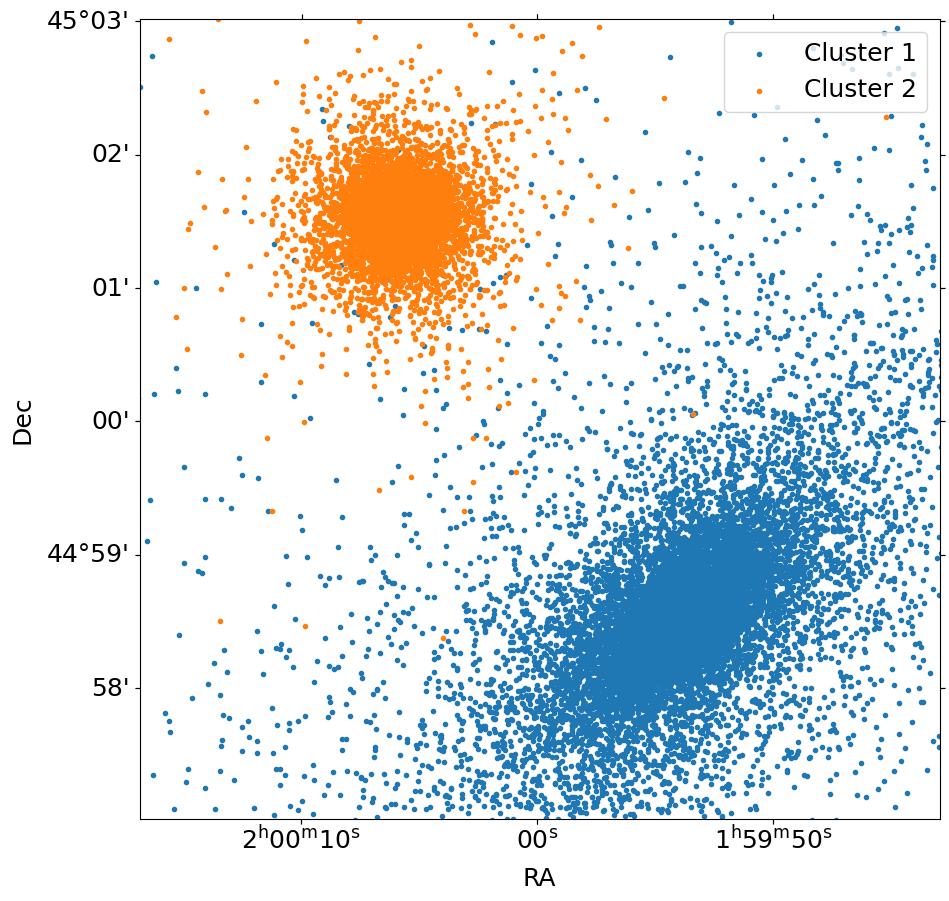
We can quickly show the positions using the plot() method of the SimputPhotonList instances. For simplicity, we’ll only show every 100th event using the stride argument, and restrict ourselves to a roughly \(20'\times~20'\) field of view.
[10]:
fig, ax = cluster_phlist1.plot(
    [30.0, 45.0], 6.0, marker=".", stride=100, label="Cluster 1"
)
cluster_phlist2.plot(
    [30.0, 45.0], 6.0, marker=".", stride=100, fig=fig, ax=ax, label="Cluster 2"
)
ax.legend()
[10]:
<matplotlib.legend.Legend at 0x16e110e10>
Now that we have the positions and the energies of the photons in the SimputPhotonLists, we can write them to a SIMPUT catalog, using the SimputCatalog class. Each cluster will have its own photon list, but be part of the same SIMPUT catalog:
[11]:
# Create the SIMPUT catalog "sim_cat" from the photon lists "cluster1" and "cluster2"
sim_cat = soxs.SimputCatalog.from_source(
    "clusters_simput.fits", cluster_phlist1, overwrite=True
)
sim_cat.append(cluster_phlist2)
soxs : [INFO     ] 2026-04-13 07:44:15,666 Appending source 'cluster1' to clusters_simput.fits.
soxs : [INFO     ] 2026-04-13 07:44:15,709 Appending source 'cluster2' to clusters_simput.fits.
Simulate an Observation
Finally, we can use the instrument simulator to simulate the two clusters by ingesting the SIMPUT file, setting an output file "evt.fits", setting an exposure time of 50 ks (less than the one we used to generate the source), the "lynx_hdxi" instrument, and the pointing direction of (RA, Dec) = (30.,45.) degrees.
[12]:
soxs.instrument_simulator(
    "clusters_simput.fits",
    "evt.fits",
    (50.0, "ks"),
    "lynx_hdxi",
    [30.0, 45.0],
    overwrite=True,
)
soxs : [INFO     ] 2026-04-13 07:44:15,784 Simulating events from 2 sources using instrument lynx_hdxi for 50 ks.
soxs : [INFO     ] 2026-04-13 07:44:15,852 Scattering energies with RMF xrs_hdxi.rmf.
soxs : [INFO     ] 2026-04-13 07:44:16,251 Detected 113194 events in total.
soxs : [INFO     ] 2026-04-13 07:44:16,252 Adding background events.
soxs : [INFO     ] 2026-04-13 07:44:16,299 Adding in point-source background.
soxs : [INFO     ] 2026-04-13 07:44:20,645 Simulating events from 1 sources using instrument lynx_hdxi for 50 ks.
soxs : [INFO     ] 2026-04-13 07:44:21,948 Scattering energies with RMF xrs_hdxi.rmf.
soxs : [INFO     ] 2026-04-13 07:44:22,977 Detected 1160628 events in total.
soxs : [INFO     ] 2026-04-13 07:44:22,981 Generated 1160628 photons from the point-source background.
soxs : [INFO     ] 2026-04-13 07:44:22,982 Adding in astrophysical foreground.
soxs : [INFO     ] 2026-04-13 07:44:30,994 Adding in instrumental background.
soxs : [INFO     ] 2026-04-13 07:44:31,162 Making 8537713 events from the galactic foreground.
soxs : [INFO     ] 2026-04-13 07:44:31,162 Making 130461 events from the instrumental background.
soxs : [INFO     ] 2026-04-13 07:44:32,250 Observation complete.
soxs : [INFO     ] 2026-04-13 07:44:32,250 Writing events to file evt.fits.
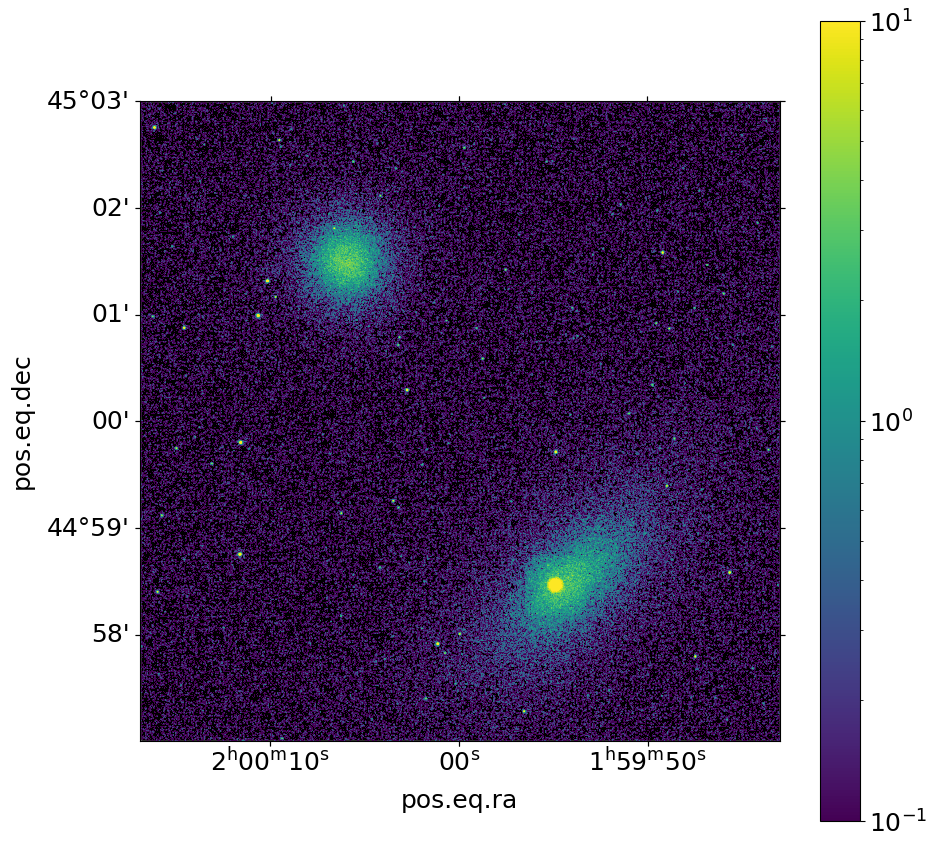
We can use the write_image() function in SOXS to bin the events into an image and write them to a file, restricting the energies between 0.5 and 2.0 keV:
[13]:
soxs.write_image("evt.fits", "img.fits", emin=0.5, emax=2.0, overwrite=True)
Now we show the resulting image:
[14]:
fig, ax = soxs.plot_image(
    "img.fits", stretch="log", cmap="viridis", vmin=0.1, vmax=10.0, width=0.1
)
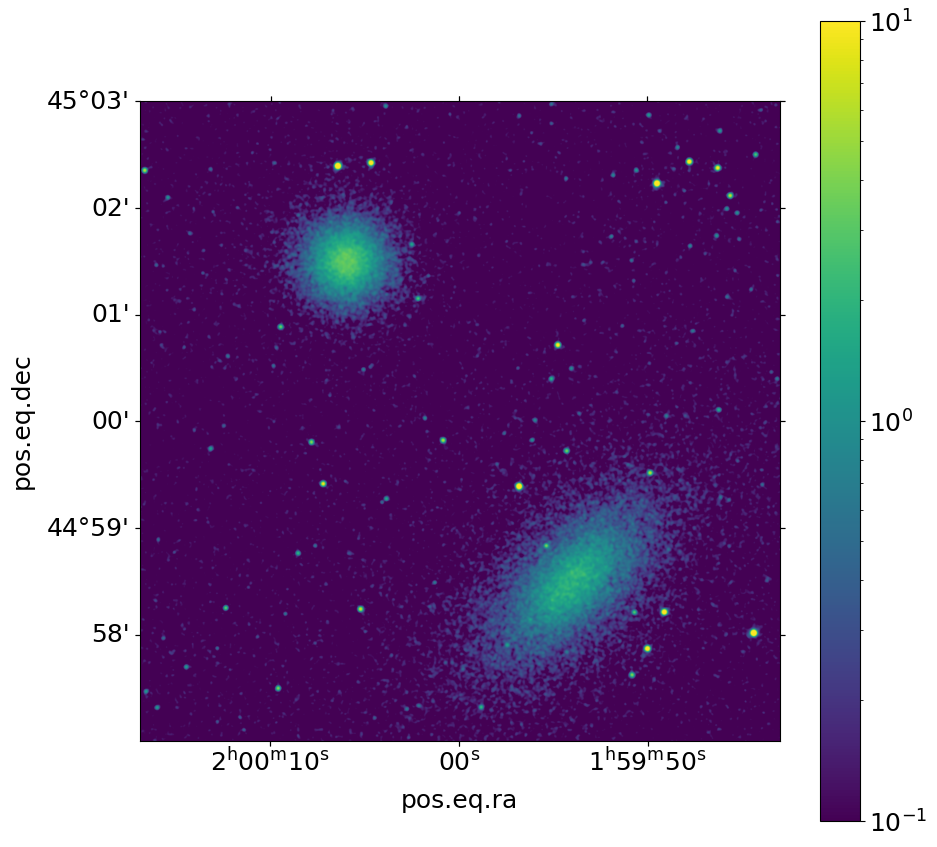
One can also apply smoothing of the image using AstroPy convolution techniques. First, one defines a smoothing kernel:
[15]:
from astropy.convolution import Gaussian2DKernel

kernel = Gaussian2DKernel(2.0) # here, 2.0 is the standard deviation of the Gaussian in pixel
Then, you can call plot_image() again with the smoothing_kernel argument:
[16]:
fig, ax = soxs.plot_image(
    "img.fits", stretch="log", cmap="viridis", vmin=0.1, vmax=10.0, width=0.1,
    smoothing_kernel=kernel,
)
Alternative Way to Generate the SIMPUT Catalog
In the above example, we generated the SIMPUT catalog for the observation of the two clusters using SimputPhotonLists, which in previous versions was the only option available in SOXS. It is also possible to use two SimputSpectrum objects, which is another type of SIMPUT source that consists of a spectrum and (optionally) an image. The image is used by SOXS to serve as a model to generate photon positions on the sky. If no image is included, then the source is simply a point source.
In this case of course, the clusters are two extended sources, so we can use the from_models method in a similar way as we did above, but in this case we have to supply the width and the resolution (nx) of the image that we want to associate with the spectrum:
[17]:
width = 10.0  # arcmin by default
nx = 1024  # resolution of image
cluster_spec1 = soxs.SimputSpectrum.from_models("cluster1", spec1, pos1, width, nx)
cluster_spec2 = soxs.SimputSpectrum.from_models("cluster2", spec2, pos2, width, nx)
Then we create the SIMPUT catalog in essentially the same way as before:
[18]:
# Create the SIMPUT catalog "sim_cat" from the spectra "cluster1" and "cluster2" in the same way
sim_cat2 = soxs.SimputCatalog.from_source(
    "clusters2_simput.fits", cluster_spec1, overwrite=True
)
sim_cat2.append(cluster_spec2)
soxs : [INFO     ] 2026-04-13 07:44:55,822 Appending source 'cluster1' to clusters2_simput.fits.
soxs : [INFO     ] 2026-04-13 07:44:55,850 Appending source 'cluster2' to clusters2_simput.fits.
Run the instrument_simulator:
[19]:
soxs.instrument_simulator(
    "clusters2_simput.fits",
    "evt2.fits",
    (50.0, "ks"),
    "lynx_hdxi",
    [30.0, 45.0],
    overwrite=True,
)
soxs : [INFO     ] 2026-04-13 07:44:55,920 Simulating events from 2 sources using instrument lynx_hdxi for 50 ks.
soxs : [INFO     ] 2026-04-13 07:44:55,987 Scattering energies with RMF xrs_hdxi.rmf.
soxs : [INFO     ] 2026-04-13 07:44:56,396 Detected 114286 events in total.
soxs : [INFO     ] 2026-04-13 07:44:56,396 Adding background events.
soxs : [INFO     ] 2026-04-13 07:44:56,444 Adding in point-source background.
soxs : [INFO     ] 2026-04-13 07:45:00,596 Simulating events from 1 sources using instrument lynx_hdxi for 50 ks.
soxs : [INFO     ] 2026-04-13 07:45:01,942 Scattering energies with RMF xrs_hdxi.rmf.
soxs : [INFO     ] 2026-04-13 07:45:03,346 Detected 1890491 events in total.
soxs : [INFO     ] 2026-04-13 07:45:03,350 Generated 1890491 photons from the point-source background.
soxs : [INFO     ] 2026-04-13 07:45:03,350 Adding in astrophysical foreground.
soxs : [INFO     ] 2026-04-13 07:45:11,393 Adding in instrumental background.
soxs : [INFO     ] 2026-04-13 07:45:11,558 Making 8533476 events from the galactic foreground.
soxs : [INFO     ] 2026-04-13 07:45:11,558 Making 130308 events from the instrumental background.
soxs : [INFO     ] 2026-04-13 07:45:12,718 Observation complete.
soxs : [INFO     ] 2026-04-13 07:45:12,747 Writing events to file evt2.fits.
and make an image:
[20]:
soxs.write_image("evt2.fits", "img2.fits", emin=0.5, emax=2.0, overwrite=True)
fig, ax = soxs.plot_image(
    "img2.fits", stretch="log", cmap="viridis", vmin=0.1, vmax=10.0, width=0.1
)
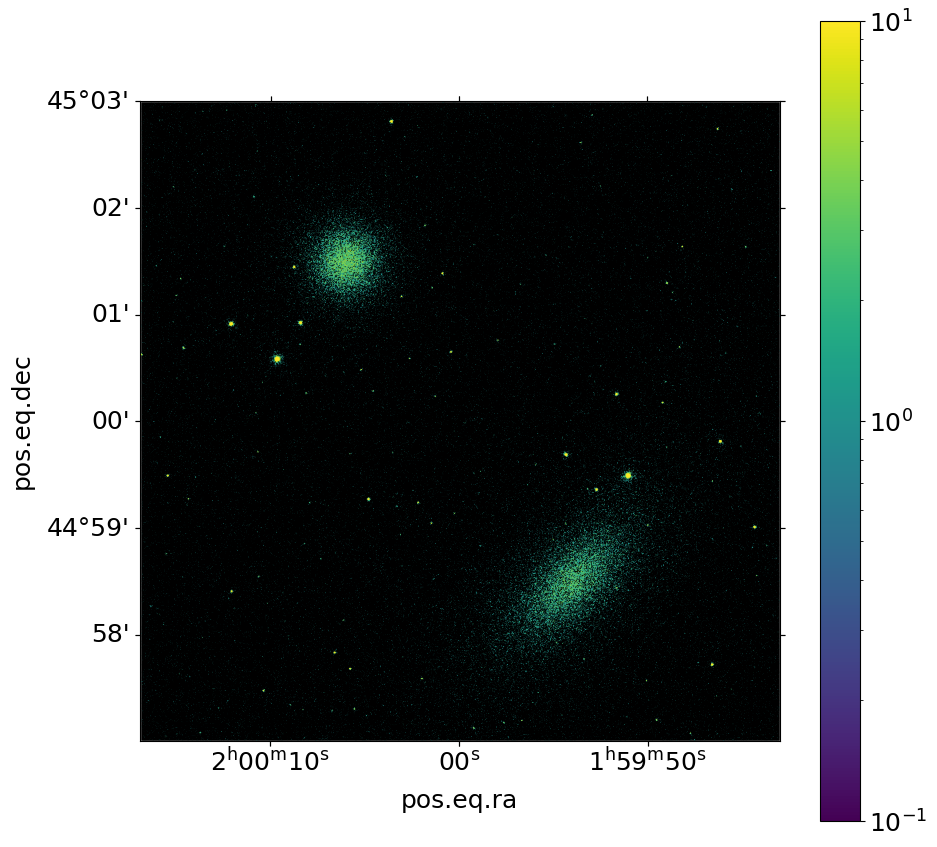
We used the same models, so the resulting images are the same except that different random numbers were used.